
01
Your day, against your normal
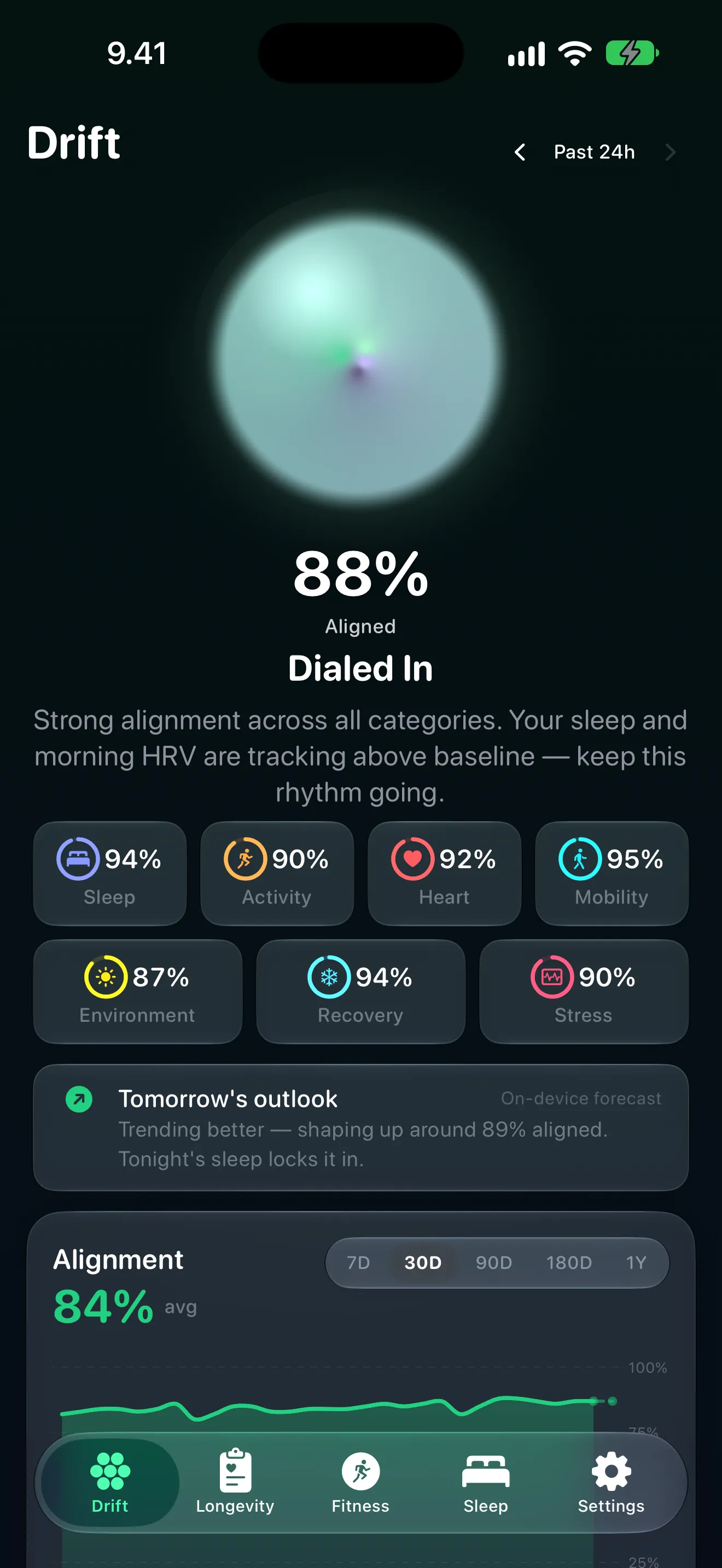
The Drift Score compares today with your own baseline for the same weekday, across seven categories, and says whether you're aligned, drifting or off course.

Drift
iPhone · Apple Watch
Drift is a private longevity coach for iPhone and Apple Watch. Your daily Drift Score compares today with your own baseline; your Longevity Score puts eight biomarkers in the context of age-adjusted research. Health analysis stays on your devices.
Free to download, with your Drift, Longevity, Fitness and Sleep scores, the Apple Watch app and widgets free. The details behind them run on one subscription: US$5.99 a month or US$49.99 a year, with a 7-day free trial for eligible new subscribers.
New in Drift 2.0
Drift 2.0 redesigns the Apple Watch app around a five-sided glance at your Drift level, which the Watch can now work out from its own fresh Health readings, and shows the heart-rate zones of today's workouts. On iPhone Duo, charts sit beside their coaching, and Siri shortcuts cover your score, sleep and wind-down reminder. Drift 2.0 still runs on any iPhone with iOS 26.
Your Drift level sits inside a five-sided outline, one side for each of the five categories furthest from your baseline, coloured by how far off it is. Tap it for all seven categories and your week; Strain, Recovery and Sleep are right below.
Your iPhone shares the model it has trained and your baselines with your Watch, which scores its own fresh Health readings the same way and labels the result Watch estimate. Without enough fresh data, it shows your iPhone's latest result. The model stays between your own devices.
Requires Drift set up on a paired iPhone
Review today's completed workouts and the time in each of five heart-rate zones: the zones Apple Health recorded where available, and labelled estimates otherwise.
Requires watchOS 27 for recorded zones
Open a biomarker, your Longevity Score or your Drift Score and the chart sits beside its explanation and coaching. Compact screens and larger text sizes keep the familiar scrolling view.
Requires iPhone Duo (iOS 27.1)
Show Drift Score, Open Sleep Summary and Enable Wind-Down Reminder, from Siri or the Shortcuts app. Each opens Drift once your iPhone is unlocked. The wind-down reminder needs Drift set up and alarm permission.
Inside the app
The Drift Score compares today with your own baseline for the same weekday, across seven categories, and says whether you're aligned, drifting or off course.
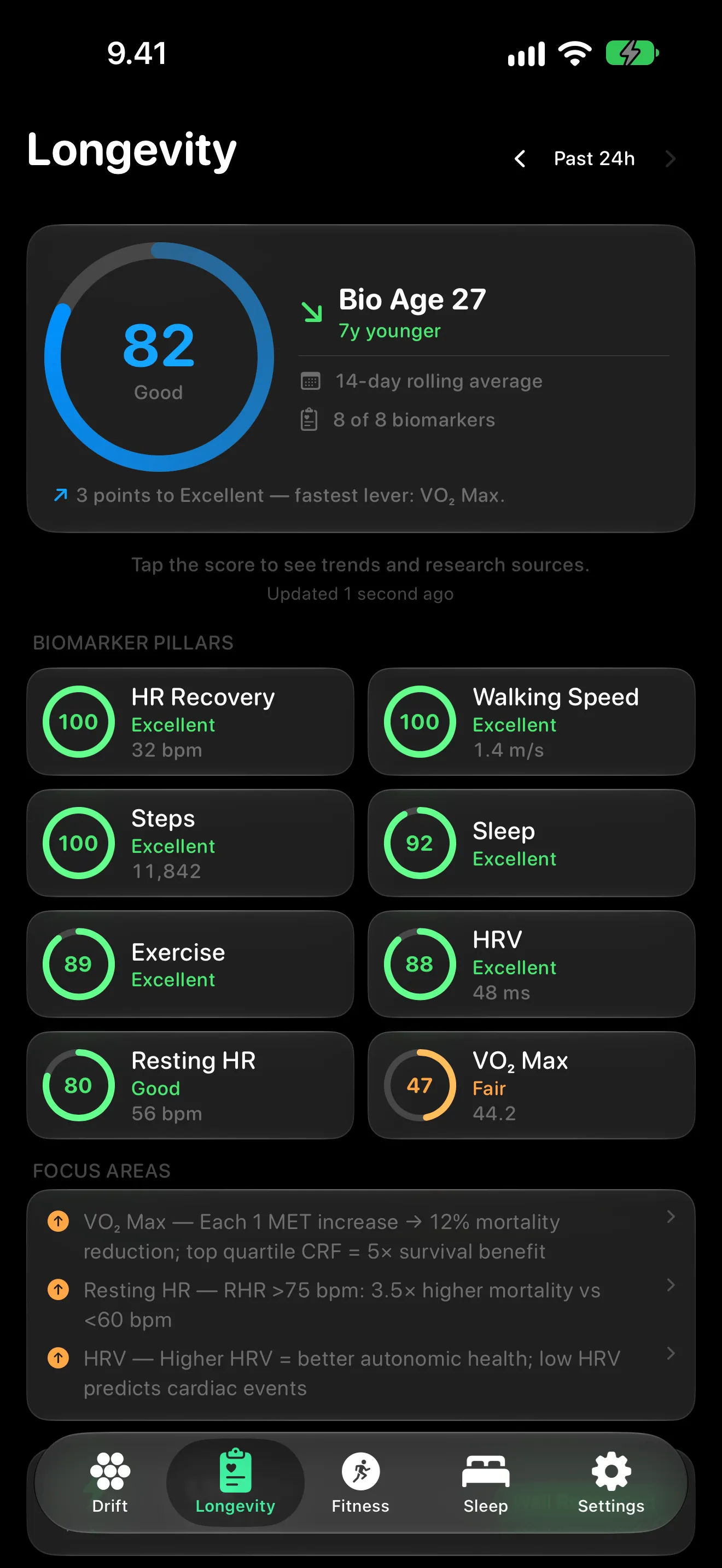
The Longevity Score puts VO₂ max, HRV, resting heart rate, sleep, steps, exercise, heart-rate recovery and walking speed in the context of age-adjusted research, with your biological age.
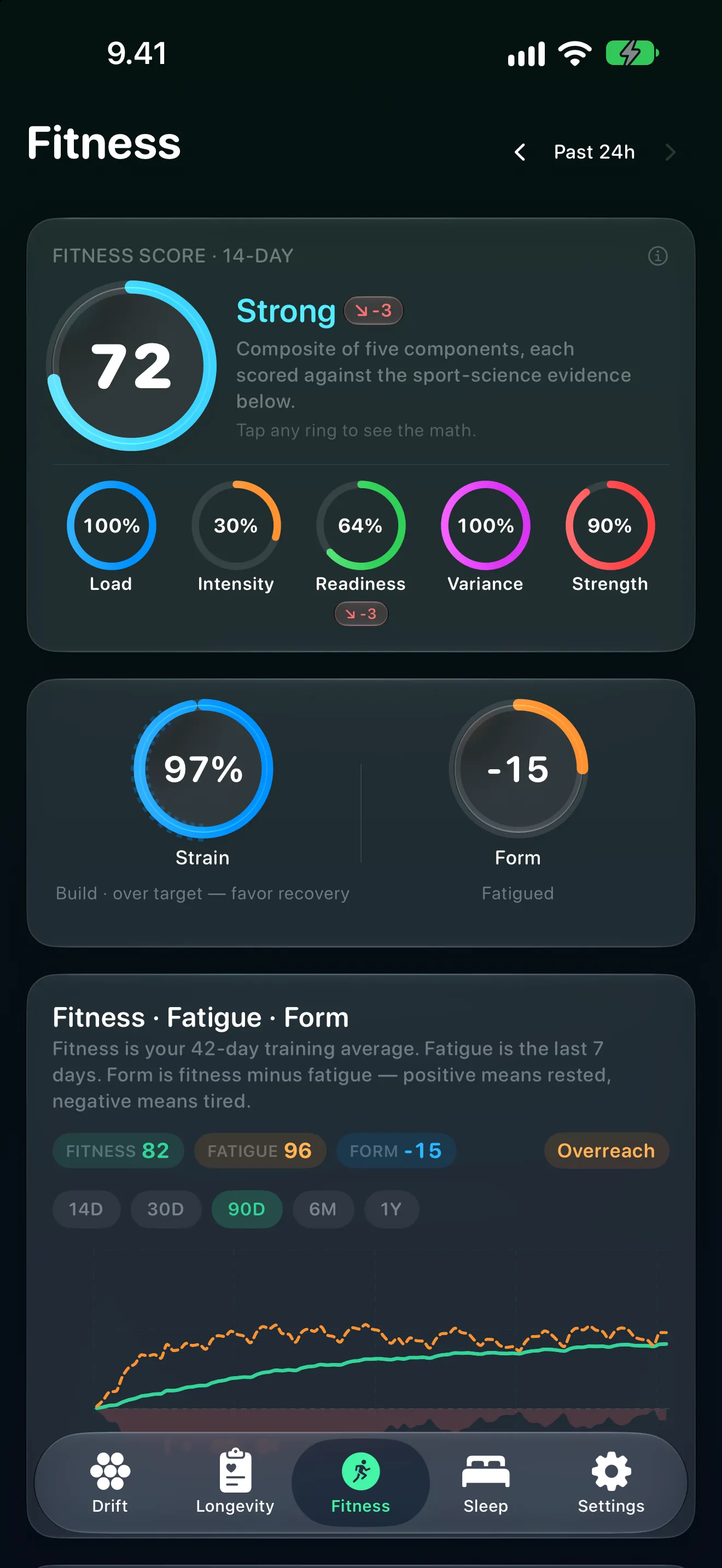
Fitness, strain and form over 14 days, with five sub-scores that trace back to the workouts behind them.
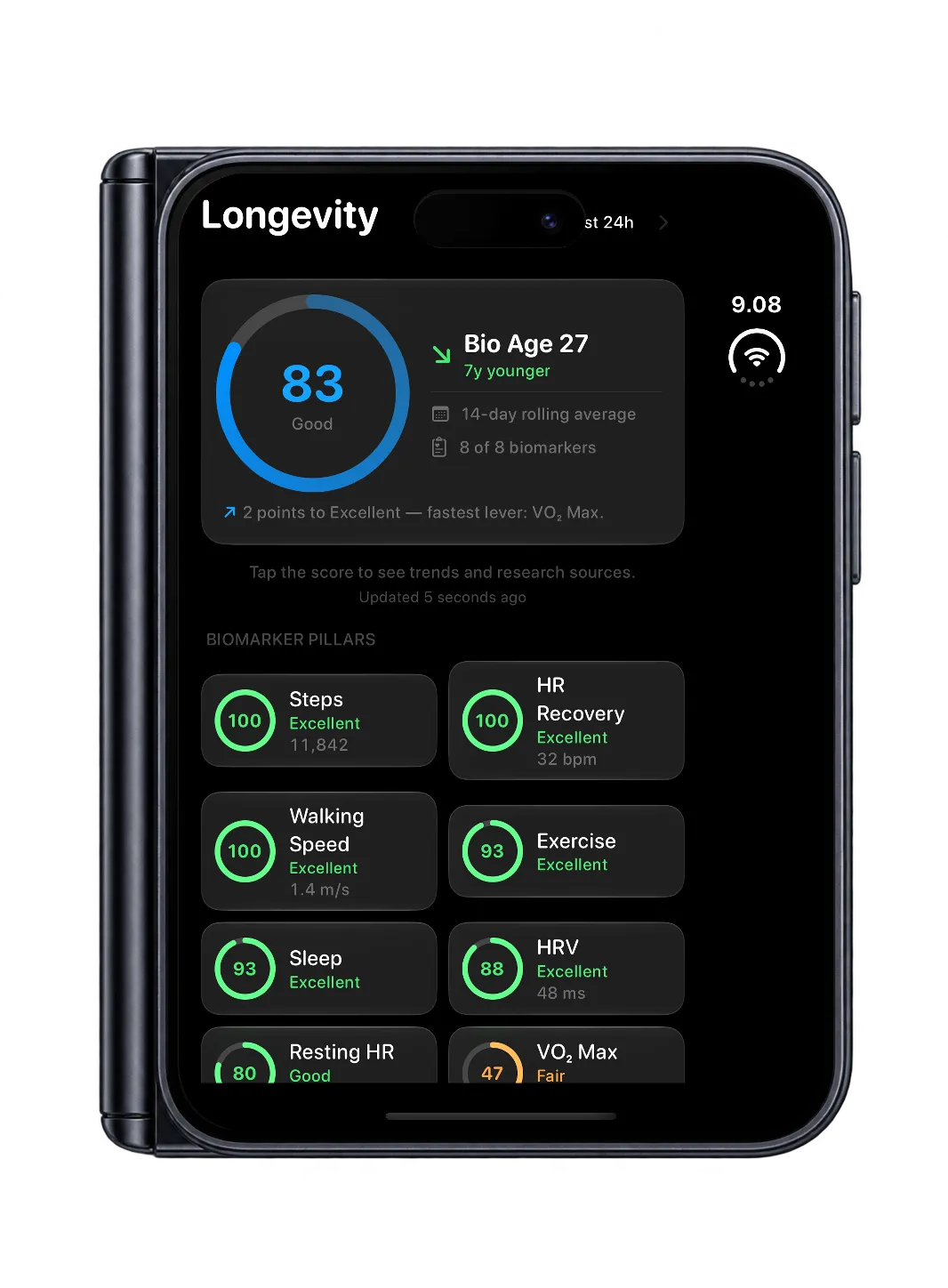
Open the phone and biomarker, Longevity Score and Drift Score screens put their charts beside the explanation and coaching. Closed, Drift fits the outer screen.
More screens
Features
Drift is a private longevity coach for iPhone and Apple Watch. Its daily Drift Score compares today with your own baseline; its Longevity Score grades eight biomarkers against age-adjusted research thresholds; and it turns both into practical guidance for sleep, training and recovery.
Compares today against your personal rolling baseline — not population averages. Your Tuesday is compared to your previous Tuesdays. Shows as Aligned, Drifting or Off Course across Sleep, Activity, Heart, Mobility, Environment, Recovery and Stress.
Eight biomarkers — VO₂ max, heart-rate variability, resting heart rate, sleep, steps, exercise, heart-rate recovery and walking speed — graded against age-adjusted thresholds from research and guidelines, as a 14-day rolling average. The sources are listed in the app.
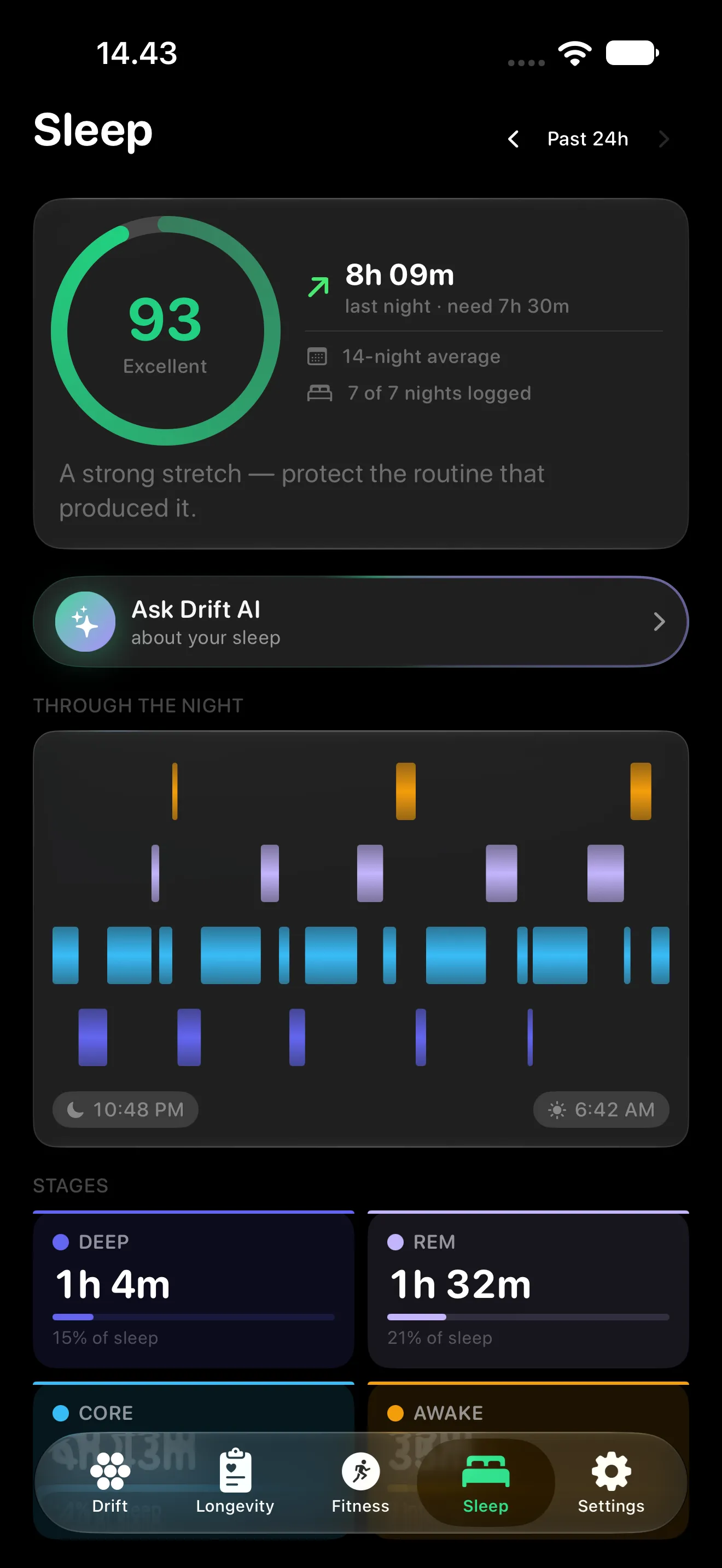
Your sleep score rewards a regular bedtime — nights within 30 minutes of your usual time earn full marks. The Bedtime Window card shows tonight's window, your last 14 nights, and exactly what landing in it is worth.
Hit your window on 10 of 14 nights, with a progress ring, night-by-night results, a before-and-after on your bedtime spread, and an optional wind-down reminder. Travel nights are exempt, because jet lag isn't a failure of discipline.
A 0–100 grade for how your training is loading you. Banister fitness, strain and form across the last 14 days, with five sub-scores — Load, Intensity, Readiness, Variance, Strength — each tracing back to the workouts that drove them.
Easy vs moderate vs hard mapped to Seiler's three-zone model, the 80/20 split endurance research keeps returning to. The form forecast projects the next 7 days if you take a rest week.
Your latest reading, a signed 90-day development chip, your FRIEND percentile for age and sex, and a 90-day sparkline with the p50–p90 good zone — the most heavily weighted biomarker in the Longevity Score, tracked over time.
Stage-level breakdown of REM, Core, Deep and Awake with efficiency, a tappable sleep bank, overnight HRV and resting-heart-rate tiles, and a 7-day trend, graded against the 7–9 hour range from sleep research.
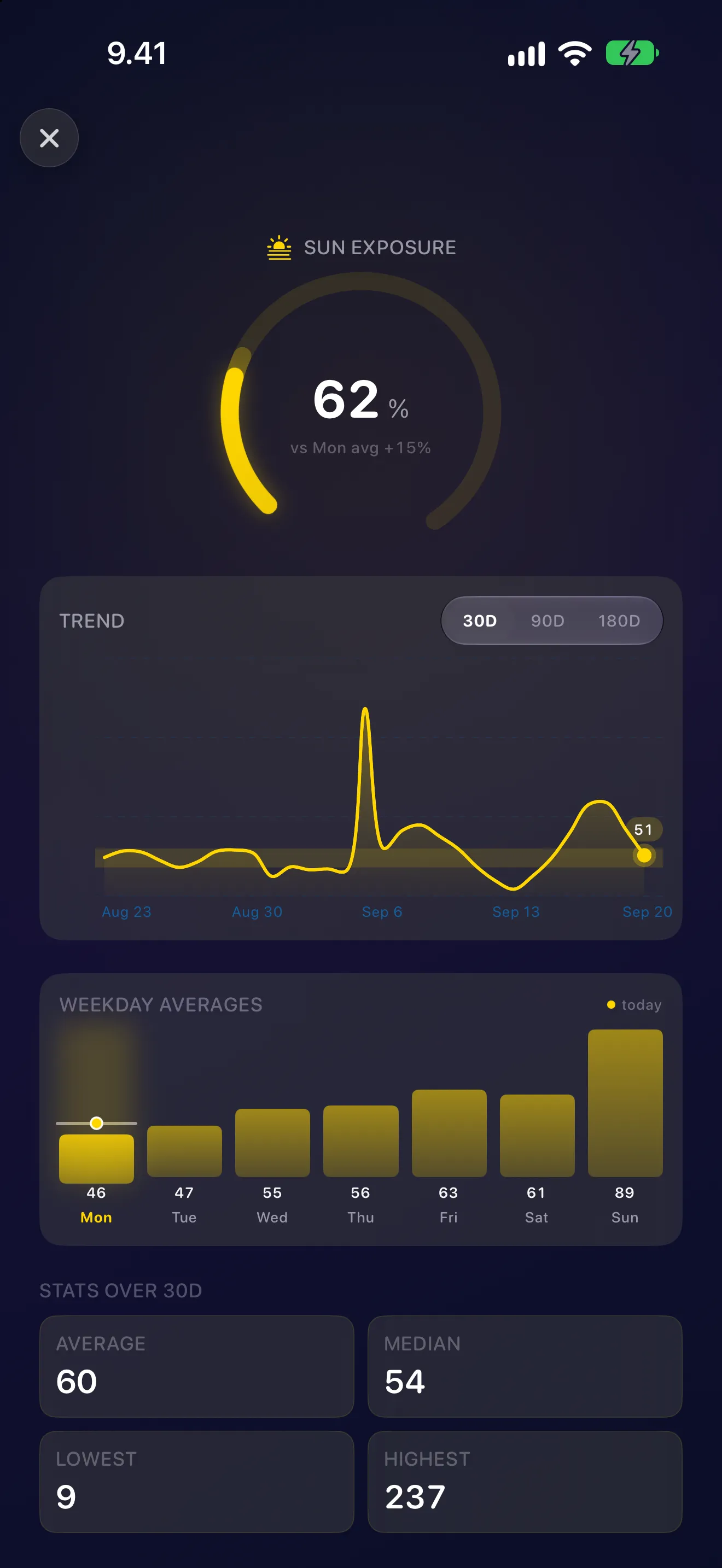
Tracks your daily UV dose (Standard Erythemal Dose, SED) from daylight exposure and your local UV index from Apple Weather, personalised to your Fitzpatrick skin type. Trend chart, weekday averages, and 30/90/180-day stats.
Sleep Debt, Overtraining, Recovery Gap, Bedtime Drift, Fitness Plateau, Sedentary Creep, Cold Streak, HRV Rebound, Jet Lag and 18 more, four of them positive streaks. Each pattern explains what it detected and why it matters.
Ask why your score changed, how your week trended or what a pattern means, answered on your iPhone by Apple's on-device Foundation Models from your own data. Needs Apple Intelligence turned on; scores and daily insights work without it.
A directional estimate from six measures — VO₂ max, resting heart rate, HRV, sleep, walking speed and exercise: “Your body functions like someone N years younger.” An approximation, not a clinical or epigenetic test.
Today's Drift level, strain, recovery and sleep on your wrist. The Watch reads its own Health data, works out today's strain from your workouts and can update your Drift level with the model your iPhone has trained. Seven complications keep Drift Score, sleep, strain and Sun Dose a glance away.
Today’s orb, percent, level and top category live on the Lock Screen and Dynamic Island. No need to open the app to see how the day is tracking.
Home Screen and Lock Screen widgets keep your Drift Score at a glance, and Drift, Fitness, Sleep and Sun trend from 7 days to a full year — colour-coded by level, with today’s partial data as a dashed projection.
Longevity Score
Each biomarker is graded against age-adjusted thresholds from published research and guidelines, listed with their sources in the app. The research links each measure to health and longevity; the weights are Drift's own model.
Apple Watch
See your sleep, recovery and personal Drift level at a glance. Five coloured sides show the categories furthest from your normal; Strain shows today's load against a visual target on the ring. Your Watch can score its own fresh Health readings with the model your iPhone has trained.
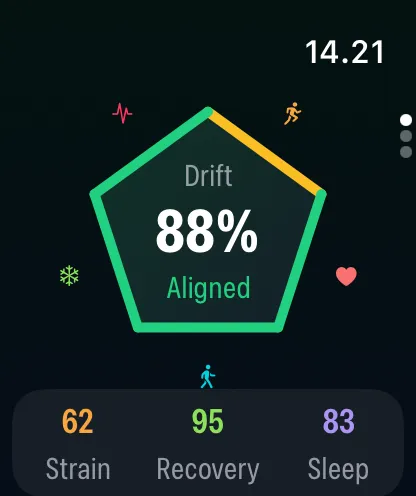
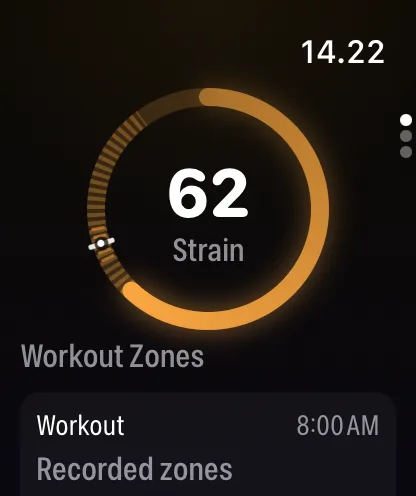
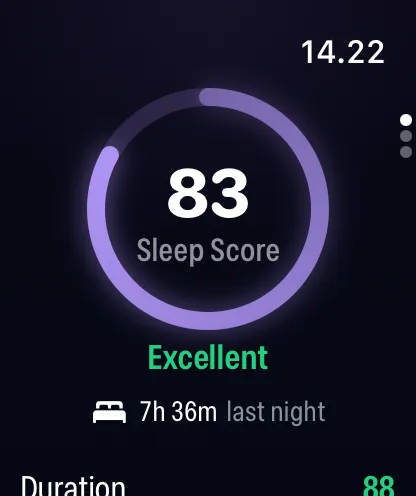
Drift 2.0 screens, with sample data.
Pricing
$0 no time limit
$5.99 per month
$49.99 per year
Prices in US dollars. Monthly and yearly plans include a 7-day free trial for eligible new subscribers, and the App Store shows the price in your country before you buy. Subscriptions renew automatically until you cancel.
Questions
Drift is a private longevity coach for iPhone and Apple Watch. It reads your Apple Health data and gives you a daily Drift Score against your own baseline, a Longevity Score across eight biomarkers, a biological-age estimate, a Fitness Score and bedtime guidance, with the analysis on your devices.
Drift Score compares today with your own rolling baseline for the same weekday. Longevity Score grades eight health measures against age-adjusted thresholds drawn from research and guidelines. One highlights personal change; the other gives longer-term context.
Yes. It reads whatever is in Apple Health, so it works with an Apple Watch or any ring, band or watch that writes to Health. Available measures vary by device and permissions; with an iPhone alone you get a partial score from activity and steps.
Yes, through Apple Health. Drift never talks to a manufacturer's cloud; it reads whatever the device or its app writes to Health.
Drift adjusts your chronological age using available VO2 max, resting heart rate, HRV, sleep, walking speed and exercise measures. It is a directional estimate from these measures, not a clinical or epigenetic test or a prediction of years left to live.
The Drift Score needs about four weeks of history: at least four earlier days of the same weekday for each measure. Drift imports up to 60 days of your existing Apple Health history on first launch, so if you've worn a watch before it can calibrate straight away.
Partly. The Watch works out today's strain from workouts in its own Apple Health data, and with enough fresh readings it updates your Drift Score itself, labelled Watch estimate. The model behind that estimate, your personal training inputs and HRV baseline, and your sleep, longevity and fitness scores come from the iPhone. Complication refreshes follow watchOS's own schedule.
Yes. Drift is built specifically for iPhone Duo: on an opened Duo with iOS 27.1, biomarker, Longevity Score and Drift Score screens place their charts beside the explanation and coaching. Compact screens and larger text sizes keep the scrolling view.
Yes. Ask Drift uses Apple's on-device Foundation Models, so it needs an iPhone with Apple Intelligence available and turned on. Scores, patterns and daily insights work without it.
Partly. Your daily Drift Score with today's insight, your Longevity, Fitness and Sleep scores, the Bedtime Window, the Apple Watch app, widgets and notifications are free. The details behind them in the iPhone app, such as each category and pillar, your biological age, your earlier days and the pattern detectors, come with one auto-renewing subscription: US$5.99 a month or US$49.99 a year, with a 7-day free trial for eligible new subscribers. The App Store shows the price in your country.
No. Health analysis runs on your iPhone and Apple Watch, which share app context with each other. Stationify receives no health data, and there's no account, analytics or tracking. Apple handles purchases, and weather lookups use your approximate location.
Your iPhone shares the model it has trained and your weekday baselines with your Apple Watch. The Watch scores its own fresh Health readings the same way and labels the result Watch estimate. It updates when you open the app and in watchOS background refreshes, not continuously, and shows your iPhone's latest result when there isn't enough fresh data, the model is more than a week old or you've changed time zone. The model moves only between your own devices; Stationify never receives it.
The Watch shows the heart-rate zone durations Apple Health recorded when a supported workout provides them, and labelled estimates otherwise. Strain uses recorded zones only when you choose the Apple Health zone method on iPhone.
Show Drift Score, Open Sleep Summary and Enable Wind-Down Reminder. They open Drift after your iPhone is unlocked. The wind-down reminder needs Drift's setup to be finished and alarm permission.
Something else? The support page covers setup and troubleshooting, or write to [email protected].
Guides
Privacy
Drift reads Apple Health on your iPhone and Apple Watch and analyses it there. There's no account, no analytics SDK, no ads and no tracking, and Stationify never receives your health data. Your iPhone and Watch share app context with each other; Apple handles purchases and weather requests.
Read the privacy policy
Available now on iPhone and Apple Watch. Your scores are free, and the subscription starts with a 7-day free trial for eligible new subscribers.
Questions? [email protected]